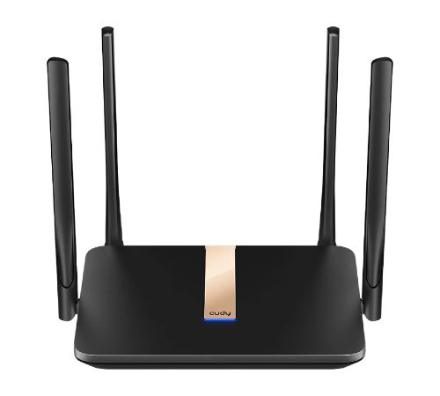
Cudy LT500D 3.0
Cudy LT500D 3.0 (4G AC1200 Wi-Fi Router with Detachable Antennas) متوفّر بالجملة عند Cudy Lebanon & Syria بلبنان وسوريا. راوترات 4G و 5G. اطلب السعر والكمية عالواتساب.
A 4G WiFi router with one nano SIM slot and four Ethernet ports, providing easy-to-install flexible networks for home, office, surveillance, exhibitions, and RV scenarios.
- 4G Cat. 4 with Max 150 Mbps DL
- 4-Stream Dual-Band Wi-Fi
- 867 Mbps + 300 Mbps Wi-Fi
- 4× Fast Ethernet Ports
- 1× Nano SIM Slot
- Detachable Cellular Antennas
- Cudy Mesh, VPN Server and Client
- Cudy App, Cloud Control
المميزات
Extension Ready. Online Guaranteed.
Verizon & Visble:Connect to your 4G/5G router via Wi-Fi / Ethernet cableLog in your 4G/5G router in browser with url http://cudy.net or 192.168.10.1Make sure your router has the latest firmware. (Go to the Advanced Settings > System > Firwmare to check. Go to download center or use Cudy app for upgrade)Go to Advanced Settings > lPv6 to enable itGo to Advanced Settings > TTL , set it as Custom, set TTL to 64 (Visible subscriber only: set HL to 65)Go to General Settings > Cellular Set APN profile as Manual and then set APN as wvzinternet (Verizon subscriber)/ VSBLINTERNET (Visible subscriber), and leave username and password as blank, and set Authentication as PAP+CHAPSave all the settings and then check. Done!T-Mobile & T-Mobile B2B Static IP:Follow step 1-3 in Verizon & Visible sectionGo to General Settings > CellularSet Network mode as 4G onlySet APN profile as Manual, Set APNas fast.t-mobile.com (Note:for static IP plan, set APN as b2b.static), and leave username and password as blank, Set Authentication as PAP+CHAPSave all the settings and then checkFinishedIf the internet still not work after all, then please wait 5 minutes and then go to Diagnostic Tools > System log to download the log and send it to cudy@support.com
Guide for Verizon/T-Mobile/Visible Subscribers
Verizon & Visble:Connect to your 4G/5G router via Wi-Fi / Ethernet cableLog in your 4G/5G router in browser with url http://cudy.net or 192.168.10.1Make sure your router has the latest firmware. (Go to the Advanced Settings > System > Firwmare to check. Go to download center or use Cudy app for upgrade)Go to Advanced Settings > lPv6 to enable itGo to Advanced Settings > TTL , set it as Custom, set TTL to 64 (Visible subscriber only: set HL to 65)Go to General Settings > Cellular Set APN profile as Manual and then set APN as wvzinternet (Verizon subscriber)/ VSBLINTERNET (Visible subscriber), and leave username and password as blank, and set Authentication as PAP+CHAPSave all the settings and then check. Done!T-Mobile & T-Mobile B2B Static IP:Follow step 1-3 in Verizon & Visible sectionGo to General Settings > CellularSet Network mode as 4G onlySet APN profile as Manual, Set APNas fast.t-mobile.com (Note:for static IP plan, set APN as b2b.static), and leave username and password as blank, Set Authentication as PAP+CHAPSave all the settings and then checkFinishedIf the internet still not work after all, then please wait 5 minutes and then go to Diagnostic Tools > System log to download the log and send it to cudy@support.com
Plug in a SIM Card to Enjoy the Network
Verizon & Visble:Connect to your 4G/5G router via Wi-Fi / Ethernet cableLog in your 4G/5G router in browser with url http://cudy.net or 192.168.10.1Make sure your router has the latest firmware. (Go to the Advanced Settings > System > Firwmare to check. Go to download center or use Cudy app for upgrade)Go to Advanced Settings > lPv6 to enable itGo to Advanced Settings > TTL , set it as Custom, set TTL to 64 (Visible subscriber only: set HL to 65)Go to General Settings > Cellular Set APN profile as Manual and then set APN as wvzinternet (Verizon subscriber)/ VSBLINTERNET (Visible subscriber), and leave username and password as blank, and set Authentication as PAP+CHAPSave all the settings and then check. Done!T-Mobile & T-Mobile B2B Static IP:Follow step 1-3 in Verizon & Visible sectionGo to General Settings > CellularSet Network mode as 4G onlySet APN profile as Manual, Set APNas fast.t-mobile.com (Note:for static IP plan, set APN as b2b.static), and leave username and password as blank, Set Authentication as PAP+CHAPSave all the settings and then checkFinishedIf the internet still not work after all, then please wait 5 minutes and then go to Diagnostic Tools > System log to download the log and send it to cudy@support.com
المواصفات
| Model Version | |
| LT500D 3.0 | |
| CPU | |
| CPU Details | 580 MHZ Single-Core, MIPS24KEC |
|---|---|
| Memory/Storage | |
| Flash/ROM | 16 MB (128 Mbit) NOR |
| DDR/RAM | 128 MB (1 Gbit) DDR2 |
| Cellular | |
| Cellular Standards | 4G Cat. 4 |
| Cellular Antennas | 2× Detachable |
| Detachable Cellular Antennas Connector | SMA Female |
| SIM Options | 1× Nano SIM Slot |
| Available Versions | EU, US, LA, CN |
| EU Version Cellular | |
| Suitable Regions | Europe, Middle East, Africa |
| Max DL Speed | 150 Mbps (LTE-FDD), 130 Mbps (LTE-TDD) |
| Max UL Speed | 50 Mbps (LTE-FDD), 30 Mbps (LTE-TDD) |
| Advanced | DL 2×2 MIMO |
| Cellular Bands | LTE-FDD: B1/3/5/7/8/20/28 LTE-TDD: B38/40/41 WCDMA: B1/5/8 |
| US Version Cellular | |
| Suitable Region | United States, Canada |
| Max DL Speed | 150 Mbps (LTE-FDD), 130 Mbps (LTE-TDD) |
| Max UL Speed | 50 Mbps (LTE-FDD), 30 Mbps (LTE-TDD) |
| Advanced | DL 2×2 MIMO |
| Cellular Bands | LTE-FDD: B2/4/5/12/13/17/25/26 LTE-TDD: B41 WCDMA: B2/4/5 |
| CN Version Cellular | |
| Suitable Regions | China, India |
| Max DL Speed | 150 Mbps (LTE-FDD), 130 Mbps (LTE-TDD) |
| Max UL Speed | 50 Mbps (LTE-FDD), 30 Mbps (LTE-TDD) |
| Advanced | DL 2×2 MIMO |
| Cellular Bands | LTE-FDD: B1/3/5/8 LTE-TDD: B34/38/39/40/41 WCDMA: B1/5/8 |
| LA Version Cellular | |
| Suitable Regions | Latin America |
| Max DL Speed | 150 Mbps (LTE-FDD), 130 Mbps (LTE-TDD) |
| Max UL Speed | 50 Mbps (LTE-FDD), 30 Mbps (LTE-TDD) |
| Advanced | DL 2×2 MIMO |
| Cellular Bands | LTE FDD: B1/2/3/4/5/7/8/28/66 LTE TDD: B40 WCDMA: B1/2/4/5/8 GSM: B2/3/5/8 |
| Wireless | |
| 5 GHz Wi-Fi Speed | 867 Mbps |
| 2.4 GHz Wi-Fi Speed | 300 Mbps |
| 5 GHz Wi-Fi Streams | 2 Spatial Streams |
| 2.4 GHz Wi-Fi Streams | 2 Spatial Streams |
| Wi-Fi Antennas | 2× External |
| Beamforming | Yes |
| FEM or PA/LNA | 5 GHz: 2× Internal, 2.4 GHz: 2× Internal |
| Range Performance | Max: 170 m (558 ft) Tested in open-space environments with minimal interference. Actual WiFi range may vary depending on layout and wall materials. Refer to the Wall Performance specifications for placement suggestions. |
| Wall Performance | Two wooden walls with thickness < 10 cm (4'') One concrete wall with thickness < 20 cm (7'') |
| Interfaces | |
| 10/100 Mbps RJ45 Ports | 4 |
| Ethernet Notes | 1× RJ45 port is WAN/LAN configurable, and the rest are LAN ports |
| Buttons and LEDs | |
| Physical Buttons | WPS Button, Reset Button |
| LED | System, Speed/Link/ACT of Ethernet Port |
| Power | |
| Power Input Type | DC Jack |
| Power Methods | DC |
| Power Input | 12V⎓1A |
| Max Power Consumption (W) | 5.27W |
| Idle Power Consumption (W) | 2.33W |
| Power Adapter In the Box | Input: 100-240V~, 50/60Hz Output: 12V⎓1A |
| Reliability | |
| EMC | ESD: Contact: 4kV; Air: 8kV |
| Environment | Operating Temperature: 0 ℃ ~ 40 ℃ (32 ℉ ~104 ℉) Storage Temperature: -40 ℃ ~ 70 ℃ (-40 ℉ ~ 158 ℉) Operating Humidity: 10% ~ 90% non-condensing Storage Humidity: 5% ~ 90% non-condensing |
| Certifications | |
| FCC, CE | |
| Mechanical | |
| Dimension | 204.8×133.2×38.3 mm 8.06×5.24×1.51 inches |
| Product Weight | 312.0 g (11.01 oz.) |
| Installation | Desktop Wall-mount |
| Package Content | |
| LT500D Power Adapter Ethernet Cable Installation Guide | |
| Ordering Information | |
| Retail Package Weight | EU: 755.4 g (26.65 oz.) |
| Retail Package Dimension | 340×275×60 mm 13.39×10.83×2.36 inches |
| Carton Net Weight | EU: 7.6 kg (16.76 lbs) |
| Carton Gross Weight | EU: 8.4 kg (18.52 lbs) |
| Carton Dimension | 57×32.5×35.8 cm 22.44×12.8×14.09 inches |